Webflow vs Framer for Marketing Sites: 9 Fit Checks Before You Choose
A marketing site usually starts with a simple brief: launch the homepage, explain the product, collect leads, and make future edits painless. The hard part arrives six weeks later, when someone needs a pricing page variant, a CMS-backed case study library, localized pages, clean redirects, and a way for non-designers to update copy without breaking the layout.
That is where the Webflow vs Framer decision becomes more than a taste debate. Webflow gives teams deeper CMS and layout control, but it asks for more structure and skill. Framer helps teams move faster from design to published page, but you need to check the limits before you build a content-heavy operation on it.
Disclosure: SK Web Pages may earn a commission if you click some provider links. Our comparison process is explained on our about page and editorial policy. Scope note: this guide is based on official pricing/product pages checked on 2026-07-06 plus cited third-party coverage. It does not claim fresh hands-on performance benchmarking.
Webflow vs Framer: the short answer
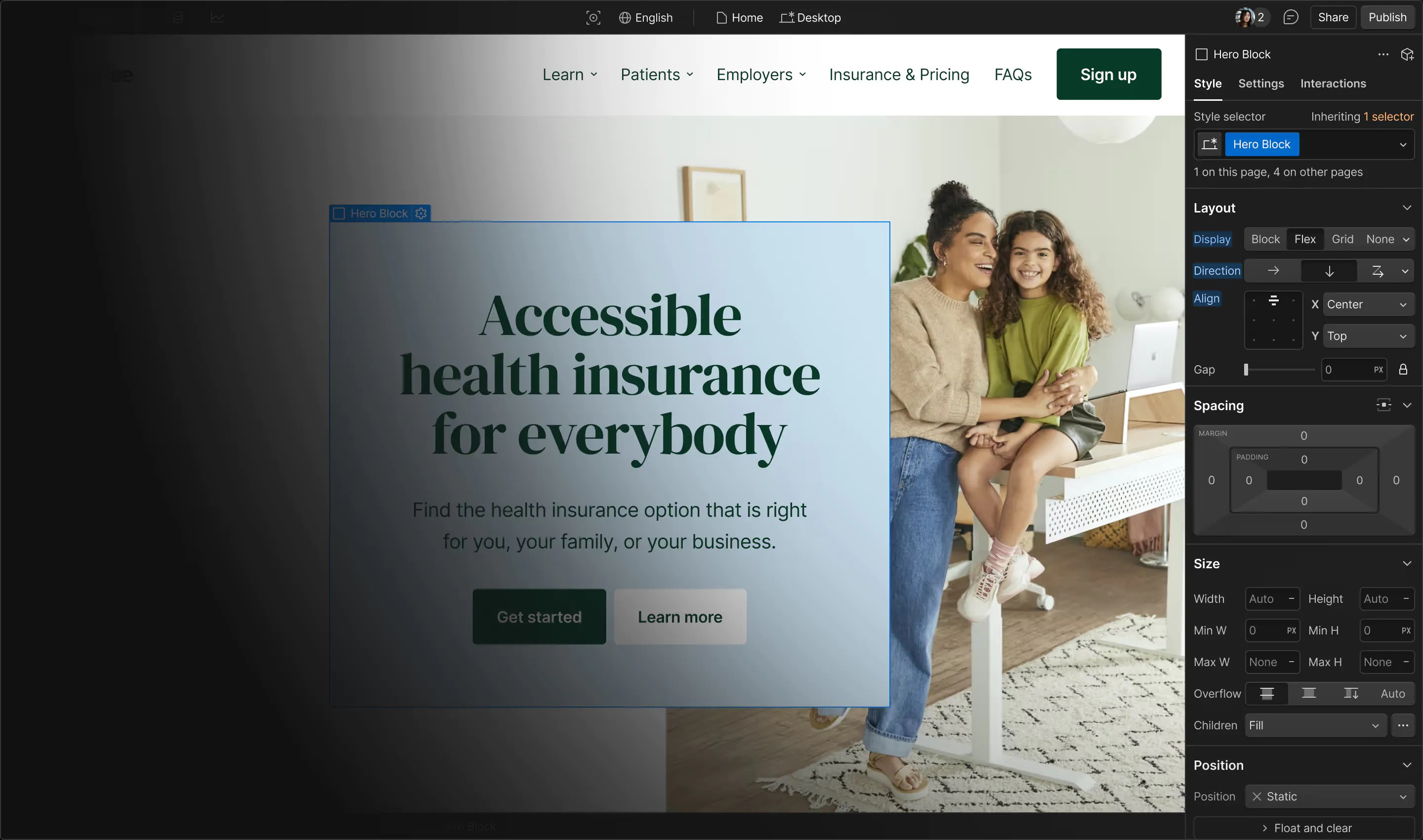
Choose Webflow if your marketing site is becoming a serious content system: multiple CMS collections, reusable design components, detailed SEO controls, agency handoff, structured publishing, and room for a more technical designer. Webflow's official pricing page lists CMS, static page, bandwidth, API, SEO, sitemap, robots, canonical, and structured-data controls across plan tiers, which makes it easier to plan a site that will grow beyond a few landing pages.
Choose Framer if your team needs to launch and revise polished pages quickly. Framer's official pricing page positions Basic for personal/creative sites and Pro for growing professional sites, with custom domains, CMS collections, bandwidth, redirects, staging, branching, editor seats, localization add-ons, and AI credits. Its product pages also put AI-assisted page generation and CMS work near the center of the workflow.
The practical rule: Webflow is the safer default for content architecture; Framer is the faster default for design-led launch velocity.
For broader context, compare this article with our Webflow review, Framer review, and website builder shortlist.
Comparison table
| Fit check | Webflow | Framer |
|---|---|---|
| Primary strength | Deep visual building, structured CMS, SEO controls, agency workflows | Fast page design, AI-assisted site creation, visual iteration, simpler publishing |
| Best reader | Marketing teams and agencies building content-rich sites | Startups, creators, and small teams shipping polished pages quickly |
| Pricing signal checked | Webflow lists Starter free, Basic from $15/month billed yearly, and Premium from $25/month billed yearly on its pricing page | Framer lists Free, Basic at $10/month, Pro at $30/month, and Enterprise custom on its pricing page |
| CMS planning | Webflow Premium lists Webflow CMS, CMS items, CMS collections, APIs, and publishing controls | Framer Basic lists 2 CMS collections and 1,000 CMS items; Pro lists 10 collections and 2,500 CMS items, with paid scale add-ons |
| Page limits | Webflow Basic lists 300 static pages; Starter lists 2 static pages | Framer Basic lists 30 custom pages; Pro lists 150 pages, then paid page add-ons up to listed caps |
| Localization | Webflow lists Localize under higher platform plans and localization-related features | Framer lists localization as an add-on and prices locales separately |
| Collaboration | Strong for agency/designer workflows, with workspace and platform tiers | Strong for small teams, with viewers, editors, content editors, branching, and staging on Pro |
| Learning curve | Higher; TechRadar describes Webflow as more advanced and less beginner-focused than simpler builders | Lower for quick visual iteration, but still requires design judgment for quality results |
| Migration risk | Strong CMS and design lock-in planning required; export and content portability need checking before build | Faster to rebuild pages, but CMS, localization, and add-on reliance should be planned before scale |
Fit check 1: how complex is your CMS?
If your site will have only a homepage, pricing page, about page, and a few product pages, Framer may be enough. Its pricing page lists CMS collections and CMS items on Basic and Pro, so a small resource library, blog, or changelog can fit without turning the project into a CMS engineering exercise.
If your roadmap includes case studies, integrations, comparison pages, guides, templates, location pages, partner pages, and programmatic internal linking, Webflow is the stronger planning baseline. Webflow's pricing page lists CMS items, CMS collections, content management APIs, content delivery APIs, item publishing controls, RSS feeds, search indexing, structured data support, sitemap controls, robots.txt controls, canonical tags, and per-page metadata controls.
That does not mean every Webflow site is automatically better. It means Webflow gives you more knobs for a content operation. The tradeoff is that someone has to design the CMS schema, maintain collection templates, and train editors not to work around the system.

Fit check 2: who will own design changes?
Webflow works well when a designer, Webflow developer, or agency owns the design system. It can produce precise responsive layouts, complex interactions, reusable styles, and structured CMS templates. TechRadar's Webflow review frames it as a professional-grade builder with strong creative control, while also noting that beginners may find it complex.
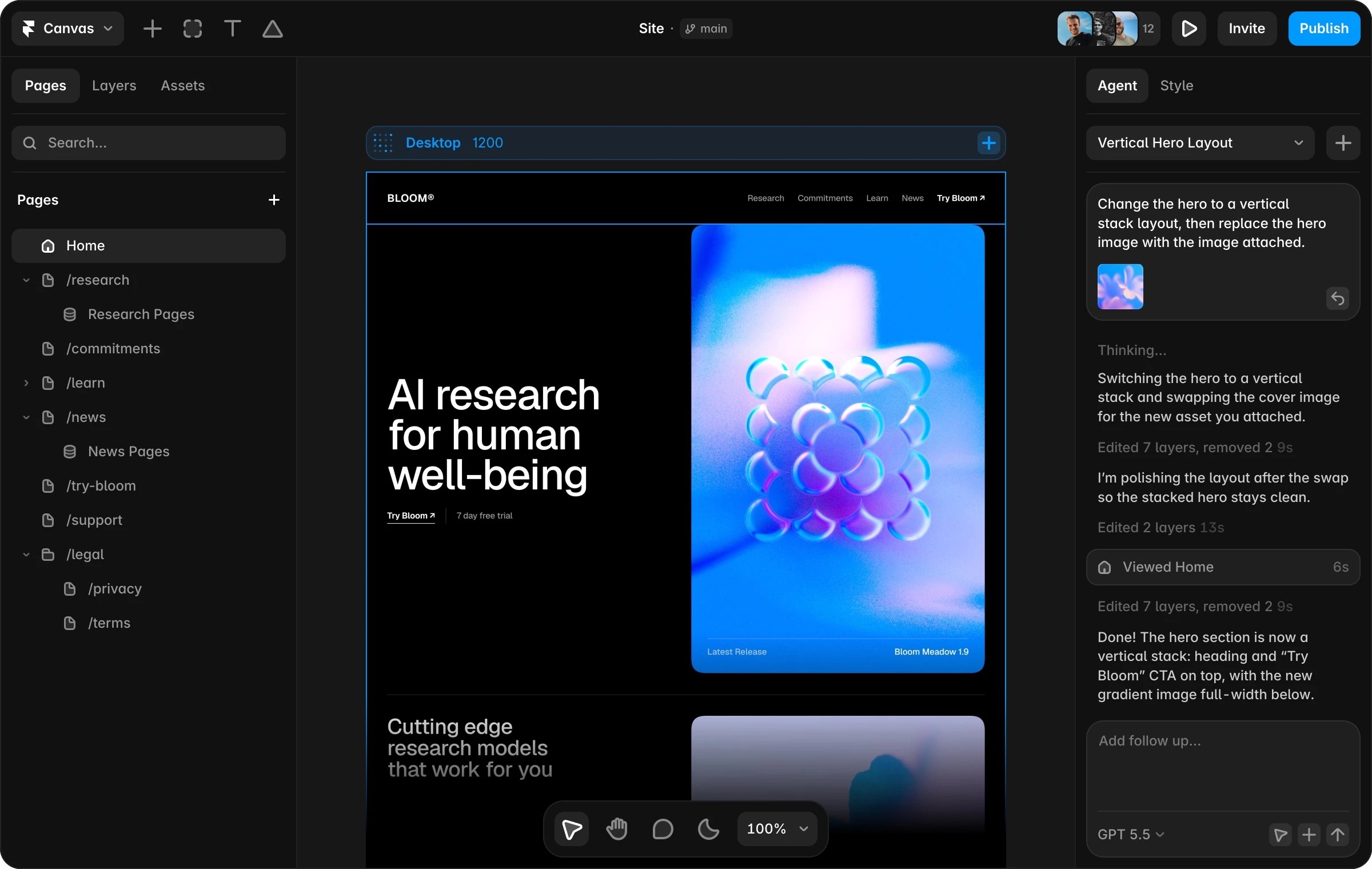
Framer works well when the marketing or founder team wants to keep visual iteration close to the surface. The builder feels closer to a design canvas that can publish. Framer also leans into AI-assisted creation: its AI product page says agents can generate editable pages, sections, copy, visuals, and CMS work from prompts.
The decision is less about which interface looks nicer. Ask who will make the third, tenth, and fiftieth change. If those edits belong to an experienced web designer, Webflow's depth pays off. If those edits belong to a founder, marketer, or startup designer trying to ship this week, Framer can reduce friction.
Fit check 3: pricing clarity and add-on risk
As checked on 2026-07-06, Webflow's pricing page lists Starter as free, Basic from $15/month billed yearly, and Premium from $25/month billed yearly for site plans, with platform and enterprise options above that. It also states that prices are in USD per site, with applicable taxes added at checkout. The important point is that Webflow pricing is not only a monthly number; it is a combination of site plan, workspace needs, CMS scale, bandwidth, localization, and governance.
Framer's pricing page lists Free, Basic at $10/month, Pro at $30/month, and Enterprise custom. Basic includes a custom domain, 2 CMS collections, 50 GB bandwidth, built-in SEO, and localization as an add-on. Pro raises limits, adds staging and branching, and lists advanced hosting and A/B testing as add-ons. Framer also lists additional editors at $20/month and content editors at $10/month.
So Framer may look cheaper at first glance, especially for a simple startup site. Webflow may become easier to justify when CMS depth, publishing controls, and agency workflows are central. Before choosing either, map the bill against pages, CMS items, locales, editors, bandwidth, and whether you need testing or advanced hosting.
Fit check 4: launch speed versus long-term operating control
Framer is compelling when the site is mostly a design problem. A startup landing page, investor-facing product site, waitlist page, creator portfolio, or small SaaS website can benefit from fast layout work and quick publishing. TechRadar's coverage of Framer's On-Page Editing also points to a direction that matters for small teams: designers can build the system while others contribute edits.
Webflow is more compelling when the site is becoming an operating asset. If your marketing site needs controlled content models, multiple authors, advanced redirects, detailed SEO, and repeatable templates, Webflow's setup cost can turn into operating leverage. You spend more time defining the system, then reuse it.
The wrong choice usually happens when teams optimize for the first publish and ignore the first year. If you will publish a few pages and revise them manually, Framer is attractive. If you will publish a content library and want structured governance, Webflow deserves the closer look.
Fit check 5: SEO controls and content operations
Both tools can support SEO basics, but the operational shape differs.
Webflow's pricing page explicitly lists SEO metadata control, alt text control, Open Graph settings, CMS item indexing control, canonical tags, sitemap controls, crawler access controls, robots.txt and LLMs.txt controls, schema markup support, and 301 redirects. That matters for content-led teams because SEO is not only title tags. It is also canonical discipline, crawl control, schema, redirects, and CMS template consistency.
Framer's pricing page lists built-in SEO on Basic and above, site redirects on Pro, static files, analytics history, and localization add-ons. For many startup sites, that is enough. For a large editorial site, you should check whether your required SEO workflow fits before migrating a full content engine into Framer.
If your main goal is to publish a credible homepage, pricing page, and product pages quickly, Framer is likely sufficient. If your main goal is to build a search-driven content machine, compare the SEO workflow against the needs of your writers, editors, and technical owner.
Fit check 6: migration and portability
Migration is where teams often regret choosing on aesthetics alone.
With Webflow, plan the CMS structure before you import or build content. Webflow gives you rich CMS modeling, but that also means your content can become shaped around Webflow collections, references, templates, and page rules. If you might move later, keep source-of-truth copy, images, redirects, and important metadata in a separate exportable system where possible.
With Framer, migration risk often appears when a fast launch becomes a larger site. It is easy to start with pages. It is harder if those pages become a CMS library with localization, editor permissions, testing, and hosting add-ons. Framer's pricing page gives enough public limit data to plan page, CMS, and bandwidth growth before you commit.
For both tools, keep domain ownership separate from builder convenience. Framer's pricing page advertises a free custom domain on yearly Basic and Pro, while Webflow lists custom-domain publishing on paid plans. A free or connected domain can be convenient, but your team should still know where the domain is registered, who controls DNS, how renewal works, and how to transfer if you leave.
Fit check 7: templates, design quality, and brand control
Webflow has a large ecosystem of templates, agencies, experts, and Webflow-specific designers. That helps when you want a mature marketing site without inventing every pattern. It also means quality varies. A template can save weeks, but a poor CMS schema or messy class system can slow every future edit.
Framer also has a strong creator and template culture, especially around modern startup sites, portfolios, and landing pages. The upside is speed and visual polish. The risk is sameness. Business Insider's Framer founder interview is useful context here: Framer's leadership has emphasized that AI makes creation easier, but design taste and quality still matter.
For a buyer, the lesson is simple: do not pick a builder because its gallery looks polished. Pick the one your team can maintain after launch. A beautiful Framer landing page that nobody can extend is not a win. A powerful Webflow build with no editor training is not a win either.
Fit check 8: support paths and team training
Webflow has a large education and community footprint. TechRadar highlights Webflow University as a major support resource, and Webflow's own navigation surfaces support, community, certified partners, developers, customer stories, and learning paths. This matters for agencies and teams that expect to train editors or hire specialists.
Framer has a more startup-friendly learning curve for many design-led teams, but you still need support discipline. Framer's pricing page links to support and billing help, and its product navigation includes Academy, Guides, Developers, Experts, and Community resources. If your team is already design-tool fluent, onboarding may feel faster.
The practical check: before you commit, assign one non-designer to make a real content change in a staging project. If they can update a headline, image, CMS item, and SEO metadata without breaking layout, the tool fits your team better than any feature matrix can prove.
Fit check 9: which one should you choose?
Choose Webflow when:
- Your site has serious CMS depth or will soon need it.
- You need advanced SEO controls, redirects, schema, canonical handling, and crawl rules.
- Your team has a Webflow-capable designer, developer, or agency.
- You expect content operations, not just page launches.
- You want tighter control over responsive layout and design systems.
Choose Framer when:
- Your site is mostly landing pages, product pages, portfolio pages, or a lightweight content hub.
- You want to move from design idea to published page quickly.
- Small-team editing, AI-assisted generation, and visual iteration matter more than deep CMS control.
- Your content model is simple enough to fit the public page and CMS limits.
- You would rather keep the site close to a design workflow than a structured CMS workflow.
The honest middle ground: many teams should start with Framer when speed is the constraint and graduate to Webflow only if CMS and governance become real needs. Agencies and content-heavy teams should usually start the other way around.
Internal link map for this decision
If you are still mapping the broader launch stack, start with our best website builders guide. If you want deeper single-brand context before choosing, read the Webflow review and Framer review. For how SK Web Pages handles affiliate recommendations and evidence, see our about page and editorial policy.

FAQ
Is Webflow better than Framer for SEO?
Webflow is usually stronger for SEO-heavy content operations because its public pricing page lists more granular controls around metadata, alt text, Open Graph, CMS indexing, canonical tags, sitemaps, robots.txt, schema, and redirects. Framer can still work for startup marketing pages, but content-heavy teams should verify every SEO workflow before choosing it.
Is Framer cheaper than Webflow?
Framer can be cheaper for simple sites. As checked on 2026-07-06, Framer listed Basic at $10/month and Pro at $30/month, while Webflow listed Basic from $15/month and Premium from $25/month billed yearly. The real bill depends on editors, CMS scale, locales, bandwidth, hosting add-ons, and whether your site needs advanced publishing controls.
Which is easier for beginners, Webflow or Framer?
Framer is usually easier for design-led beginners who want to ship a polished site quickly. Webflow is more powerful but has a steeper learning curve because it exposes more layout, CMS, and site-management concepts. If your team has no web design experience, build a trial page in both tools before committing.
Can I build a serious CMS site in Framer?
Yes, if the CMS needs are modest and fit Framer's listed limits. Framer Basic lists 2 CMS collections and 1,000 CMS items; Pro lists 10 collections and 2,500 CMS items, with paid add-ons for more scale. If your content model is complex, compare Framer's limits with Webflow's CMS structure before building.
Is Webflow or Framer better for startups?
Framer is often the better first move for a startup that needs a polished launch site fast. Webflow is often better when the startup already knows the site will become a structured content and SEO asset. The deciding factor is not startup size; it is whether your website is mainly a launch surface or a content operation.
Should agencies use Webflow or Framer?
Agencies can use both, but Webflow is usually stronger for complex client systems, CMS architecture, and handoff discipline. Framer can be excellent for rapid campaign pages, startup landing pages, portfolio-style sites, and design-led prototypes that need to publish quickly. Agencies should standardize QA, editor training, and domain ownership checks either way.
Sources
- Webflow pricing and plan limits
- Framer pricing and plan limits
- Framer AI website builder product page
- TechRadar Webflow review
- TechRadar Framer On-Page Editing coverage
- Business Insider Framer founder interview
Title Candidates
- Webflow vs Framer for Marketing Sites: 9 Fit Checks Before Your Team Chooses a Builder in 2026
- Webflow vs Framer: Which Builder Fits Your Startup Website Workflow in 2026?
- Before You Pick Webflow or Framer, Check These 9 Launch-Stack Tradeoffs
- Webflow vs Framer for CMS, Pricing, and Launch Speed: A Practical Builder Comparison
- The Webflow vs Framer Decision Guide for Teams Shipping a Commercial Website